
What Is an API? Sync and Async Explained with a Restaurant
How software talks, explained through ordering at a restaurant
An API is how software talks to software in an agreed way. A restaurant analogy, sync vs. async, and why async hands you a ticket first.
You've probably heard the phrase "API integration" at some point. An API is how software talks to other software in an agreed way. But when someone actually asks "What's an API?", it's hard to explain. It isn't hard, really. If you've ever ordered food at a restaurant, you already know how it works.
Think of a restaurant
When you walk into a restaurant, you don't go into the kitchen and cook. Instead, you do this.
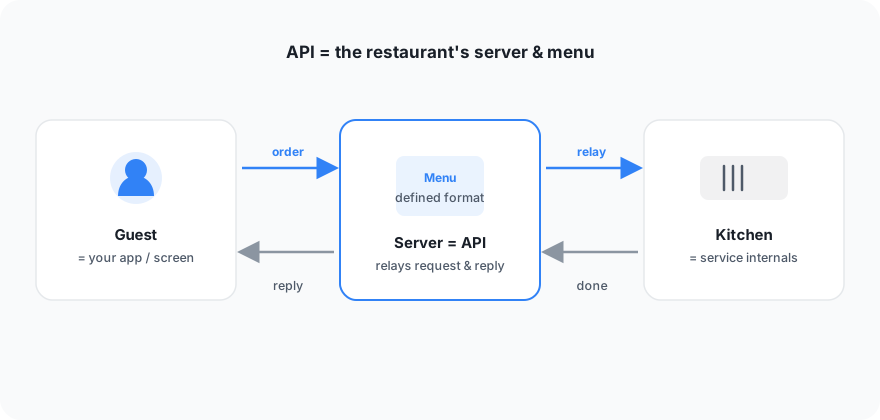
| Restaurant | Software concept | Role |
|---|---|---|
| Kitchen | The service's internals | Where the work actually happens. The customer doesn't need to know about it |
| Menu | The agreed request format | A list that defines "here's what you can order" |
| Server | API | Takes the order, passes it to the kitchen, and brings back the finished result |
The customer (the app we use) doesn't need to know the kitchen (the service's internals). Just order from the server (the API) following the menu (the agreed format), and you get what you want. An API is "a server that hides the internals and lets you exchange things only through an agreed window."
We already use APIs every day
It sounds like grand technology, but you actually use it dozens of times a day.
- When you open a weather app, the app orders from the weather service's API, "Tell me today's weather in Seoul," and brings back the result.
- When you tap directions in a map app, it asks the map service's API for a route.
- When you enter card details to pay, the app asks the payment company's API, "Charge this amount."
It's not just weather, maps, and payments. Sending a message, playing music, checking a delivery's status: behind almost every button we press stands a server.
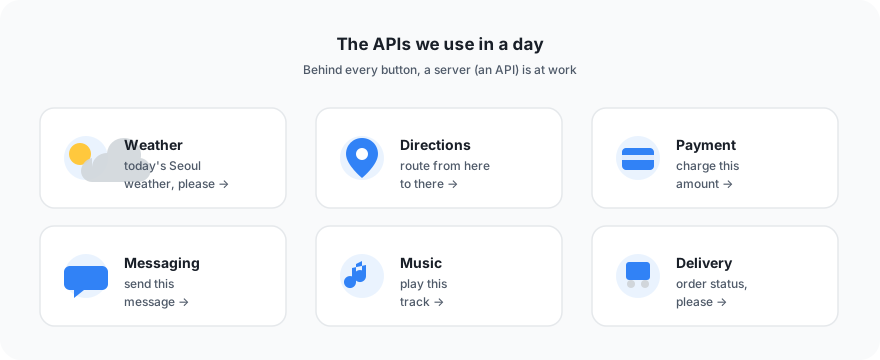
Behind every button on the screen, servers (APIs) are busily passing orders back and forth. Behind every button click, an API is at work.
When you make card news in Trail Studio
The same thing happens in our service. When you press the "Create card news" button in Trail Studio, a conversation like this takes place out of sight.
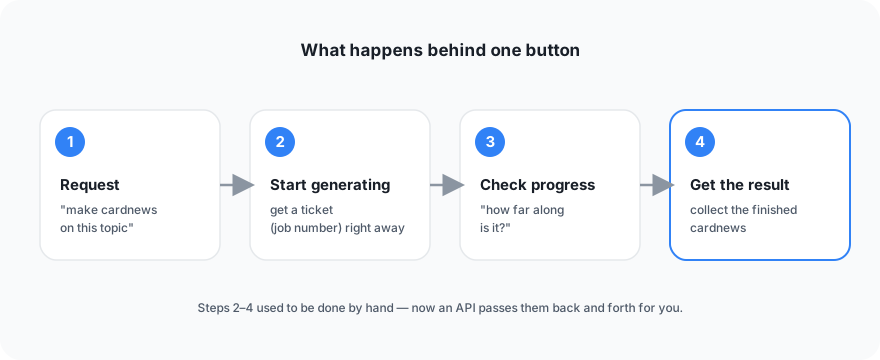
- Request: You order, "Make a 6-card card news set on this topic."
- Generation start: Trail Studio accepts the order and immediately returns a ticket (job number). Making card news takes a while, so instead of waiting for the food to come out, you get a number first [1].
- Progress check: Every so often you ask, "How far along is that job?" It answers, "Still making it" or "All done."
- Receive the result: When it's done, you get the finished output.
The key to this flow is the ticket in step 2. Here's what it looks like.
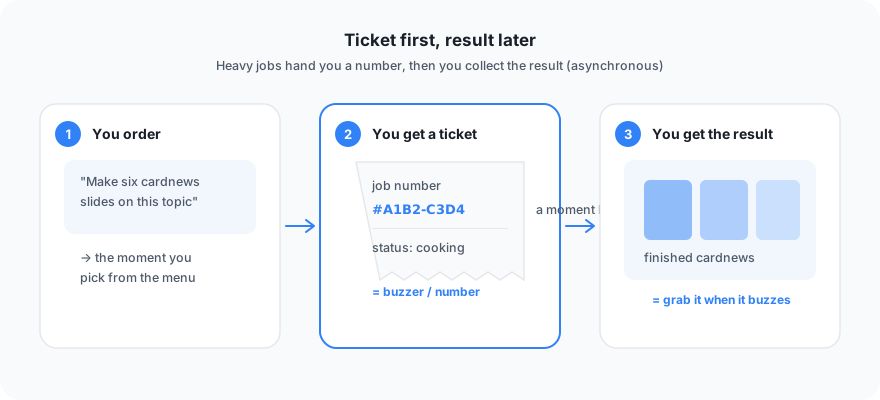
It's exactly like a restaurant where cooking takes time: you get a buzzer, wait at your table, and pick up your food when it buzzes.
This approach, where a request doesn't finish right away but you get a ticket and fetch the result later, is called asynchronous (running separately). It's a common way to handle heavy work smoothly.
Coming up next
So far, this has been about a person pressing a button, checking progress, and receiving the result. But what if AI placed the order instead of a person?
You'd just say, "Make card news on this topic," and an AI assistant would place the order, check progress, and bring you the link to the finished result. The agreement that makes this possible is MCP. We'll pick it up in the next post.
> You can try Trail Studio right now. Content generation runs on credits.
For related reading, see What is MCP (Model Context Protocol)? Connecting tools to your AI assistant, What is first-party data? How to use it in marketing after third-party cookies, and Defending against RAG hallucinations: classify the types and know the limits of automated verification.
Frequently asked questions
Can't you build an app without an API?
You can, but you'd have to deal with each service's internals directly every time, which is inefficient. An API hides the internals and lets you exchange things only through an agreed window, so different services can work together safely and quickly.
Why use the asynchronous (ticket) approach?
If you try to finish a time-consuming task like card news generation in the same moment as the request, the user has to keep waiting. Hand out a ticket (job number) first and let them fetch the result later, and even heavy work runs smoothly.
Does Trail Studio work through an API too?
Yes. When you press the "Create card news" button, four steps travel through the API: request, generation start (ticket issued), progress check, and receiving the finished result.
References
Summary
- An API is how software talks to other software in an agreed way. It plays the role of a restaurant server.
- Weather, maps, payments, messaging, music, delivery: there's an API behind almost every button we press.
- When you make card news in Trail Studio, the API carries four steps: request, generation start (ticket issued), progress check, and receiving the finished result.
- Time-consuming tasks use the asynchronous approach: get a ticket first and fetch the result later.
Why TRAIL Labs works this way
How a researcher-founder grounds measurement and recommendations, and how the three products relate to the company, is laid out on the about page, and how we work day to day is written up separately.
More posts
TRAIL Labs joins the Google for Startups Cloud Program
TRAIL Labs has joined the Google for Startups Cloud Program, gaining cloud credits and support to run our AI-search measurement and content engine at scale.
TRAIL Labs has joined the NVIDIA Inception program
TRAIL Labs has joined the NVIDIA Inception program, gaining compute, technical resources, and a network to grow our AI-search measurement and content engine.
Is AI search visibility enough? Why we changed our question
AI search visibility is countable, but more of it doesn't mean your accurate information reached the answer. What measurement and three papers taught us.
Keep reading on this topic
- Defending Against RAG Hallucinations: Types and LimitsRAG retrieves outside documents to ground answers, yet hallucinations still arise in retrieval and generation. Types, defenses, and limits of automated checks.
- Design principles for a GEO data AI agentDesign principles for a GEO data AI agent: text parsing vs. structured tool calls, blocking irreversible actions, and why skipping evals is risky.
- Open-Weight vs. API Models: Own a Domain Model with HermesOwn the model instead of renting it: why open weights, open vs. API models, Nous Research Hermes 4.3, its function-calling standard, and the data flywheel.
This post is part of the TRAIL Labs category, which collects all 19 posts on the topic. See all posts in TRAIL Labs